AMATEUR MODES OF OPERATION
APRS MAP DATA .GEO and .INF FILES
Toporama Maps .geo/.inf file information
Zipped .geo or .inf files for Toporama maps
.geo and .inf files in general
One type of map used in APRS programs is one that is scanned in and saved in one of many formats as an image file. These image files are usually in the form of a .jpg, .bmp., .gif, or .png.
Unlike vector maps such as those in the .map format, where the information is coded within the file, the APRS program needs to be told where our image map fits in the world. A separate data file with this information has to be created giving reference points in the image to geographical co-ordinates. Normally two points are chosen, upper left and a point towards the lower right of the image and then these are referenced to the lat and long of these points on the image.
WinAPRS uses Decimal Degrees and a .geo file. Inside the .geo file is the filename of the map image, two reference points (x/y pixels), lat and long in decimal degrees.
WinAPRS .geo file format: 031C07.geo
FILENAME 031C07.gif
#----------------X-------y--------lon------------lat
TIEPOINT 1 1 -77 44.5
TIEPOINT 3200 1600 -76.5 44.25
# geo file created by CJ 'Chip' Chapman, VA3KGB, 2004
Spaces between entries are "TAB"s. The "#" or ";" lines are ignored, they are for human comprehenshion
UI-View32 uses Degrees, Minutes, Seconds, and an .inf file. Inside the .inf file are the geographical coordinates of the upper left and lower right corners and a title for the image map.
UI-View .info file format: 031C07.inf
44.30.00N, 077.00.00W
44.15.00N, 076.30.00W
031C07-Sydenham
# inf file created by CJ 'Chip' Chapman, VA3KGB, 2004
The "#" or ";" lines are ignored, they are for human comprehenshion
XASTIR uses Decimal Degrees, and an .geo file. Inside the .geo file are the geographical coordinates of the upper left and lower right corners and the filename for the image map. Note that Xastir uses the .geo file for its Map Chooser, not the image file itself. See README.MAPS in the Xastir directory for more details or the Xastir Wilki. Due to the differences in the WinAPRS and Xastir geo file formats, I identify the Xastir geo file with a "-X", for example 03107-X.geo. The Toporama geo files should work with Xastir as they have the filename with the extension. The IMAGESIZE parameter makes allows Xastir to load and redraw the map faster.
Xasrtir .geo file format: 031C07-X.geo
FILENAME 031C07.gif
#----------------X-------y--------lon------------lat
TIEPOINT 1 1 -77 44.5
TIEPOINT 3200 1600 -76.5 44.25
IMAGESIZE 3200 1600
# geo file created by CJ 'Chip' Chapman, VA3KGB, 2010
Spaces between entries are "TAB"s. The "#" or ";" lines are ignored, they are for human comprehenshion
There are other optional parameters depending on how you want the map displayed. See README.MAPS.
For example, if you have downloaded the topographical map sheet 031C07 - Sydenham at 1:50,000, you will need a .geo file for WinAPRS and XASTIR or an .inf file for UI-View32. Without these files the image map is useless to APRS.
Under WinAPRS, you would place 031c07.gif and 031c07.geo into the "images" directory under WinAPRS, or in a subdirectory of the images directory.
In UI-View32, you would place 031c07.gif and 031c07.geo into the "Maps" directory under WinAPRS, or in a subdirectory of the Maps directory.
In XASTIR you place 031c07.gif and 031c07-X.geo into the /usr/local/share/xastir/maps/ directory or in a subdirectory of the Maps directory. Then you will need to tidy up the map file permissions outlined in README.MAPS, and set any layering properties (optional). A quick fix is to add the image file extension (.gig, .jpg, .bmp) to the filename in the WinAPRS geo file.
Now when you use your APRS program, the image map is available.
Note that you can rename your files for example 031c07 doesn't tell you much about the map, so to make it easier you can rename both the .gif and .geo/.inf file to a more descriptive name, in this case, we will call them 031c07_sydenham.gif and 031c07_sydenham.geo or 031c07_sydenham.inf. Note that you would also edit the filename inside these files as well.
To top of this page
Toporama Maps .geo/.inf files
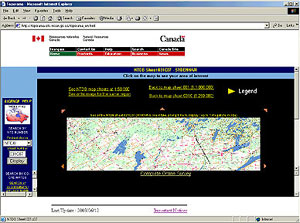
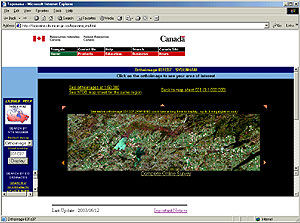
Topographical maps correspond to the published map sheets and Landsat 7 maps of the same sheets were available at: Natural Resources Canada's Toporama web site in both 1:250,000 and 1:50,000 scales. This site is now closed.
These map images are free to use, however, ensure you read the legalese of the license and modification use as these are copyrighted maps!
The topographical maps/orthoimages are GIF images and do not show all the details of the normal map sheet but are detailed enough for your
GPS/APRS/Navigation Programs. There are no Grid lines, borders or legends on the images, and any information on the American side of the border is missing from the images. Landsat 7 (orthoimage) map images do show the American side where applicable.
To top of this page
Manually creating .geo and .inf files is a tedious, time consuming task, requiring converting between decimal degrees and degrees, minutes, seconds format for the geographical lat/longs.
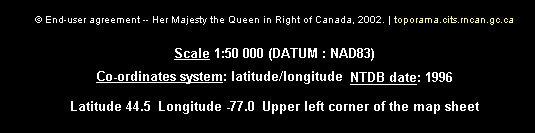
Chip, VA3KGB, created a spreadsheet to enter the NTDB map sheet number, map sheet name, scale, datum date, and the lat/long of the upper left corner of the image which is found under each map above. This data is then extrapolated from the spreadsheet and appropriate .geo and .inf data files are written automatically. (less than five minutes to write over 1000 files!!! - try writing them manually.) Each major map sheet (3 digits - 031 for example) will have 16 individual sheets - 031A to 031P at 1:250,000 and each of these will have 16 sheets at 1;50,000 - 031A01 to 031A16, therefore there are a possible 272 (16 x 16 + 16) map sheets and 272 .geo files and 272 .inf files. Not all sub map sheets are in Canada therefore depending on the area, 272 maps per group may not be available.
To top of this page
Zipped .geo and .inf files for Toporama maps
The zip files contain the map sheet .geo files or .inf files to be used in conjunction with the Toporama gif image maps (topographical and/or orthoimage). GEO and INF files created by Chip, VA3KGB. The files do not include the images!
NTDB Map Sheet #, WinAPRS .geo files, UI-View .inf files, Data collected by
001, 001_geo_toporama.zip, 001_inf_toporama.zip, VA3KGB
002, 002_geo_toporama.zip, 002_inf_toporama.zip, VA3KGB
010, 010_geo_toporama.zip, 010_inf_toporama.zip, VA3KGB
011, 011_geo_toporama.zip, 011_inf_toporama.zip, VA3KGB
012, 012_geo_toporama.zip, 012_inf_toporama.zip, VA3KGB
020, 020_geo_toporama.zip, 020_inf_toporama.zip, VA3KGB
021, 021_geo_toporama.zip, 021_inf_toporama.zip, VA3KGB
022, 022_geo_toporama.zip, 022_inf_toporama.zip, VA3KGB
030, 030_geo_toporama.zip, 030_inf_toporama.zip, VA3KGB
031, 031_geo_toporama.zip, 031_inf_toporama.zip, VA3KGB
032, 032_geo_toporama.zip, 032_inf_toporama.zip, VA3KGB
040, 040_geo_toporama.zip, 040_inf_toporama.zip, VA3KGB
041, 041_geo_toporama.zip, 041_inf_toporama.zip, VA3KGB
042, 042_geo_toporama.zip, 042_inf_toporama.zip, VA3KGB
052, 052_geo_toporama.zip, 052_inf_toporama.zip, VA3KGB
062, 062_geo_toporama.zip, 062_inf_toporama.zip, VA3KGB
As more data is manually entered and each map has its .geo/.inf files created, they will be posted here.
To top of this page